
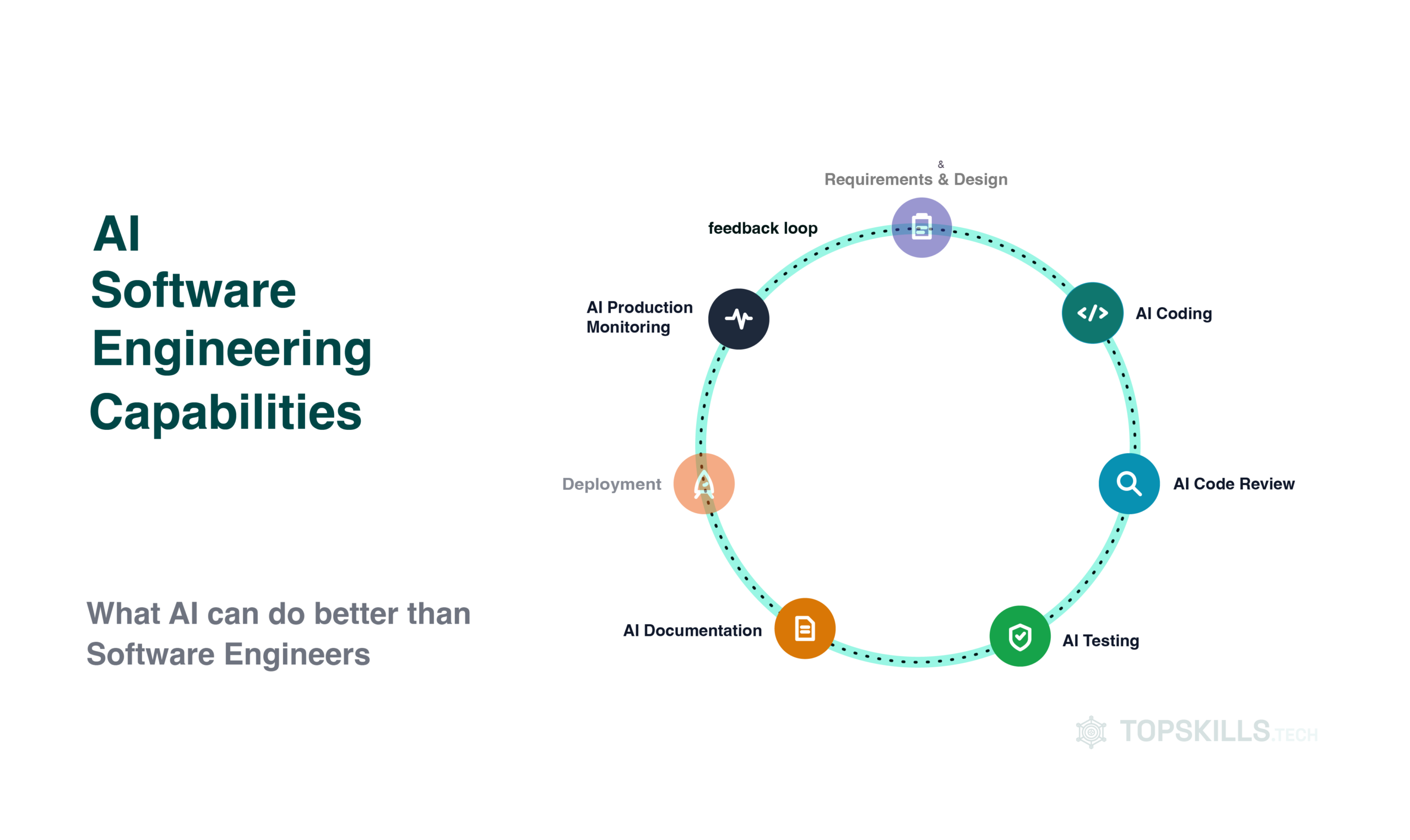
Part 2 of 5 · We look at where AI outperforms software engineers today and how those capabilities compound to accelerate software development.
In Part 1, we traced 70 years of AI and the software engineer’s capabilities evolving side by side. So what can AI do now better than a software engineer, and what makes these capabilities so powerful?
5 capabilities where AI outperforms software engineers
On a growing list of tasks, AI outperforms Software Engineers. It’s producing higher-quality results, faster, more consistently, around the clock and indifferent to which hour of the night it is.
What’s both remarkable and unnerving is the accelerated growth that emerges as these capabilities compound and amplify one another.
That’s what makes this wave of tooling feel fundamentally different from every developer-productivity trend before it.
1. AI Coding
Codebase understanding at a scale no human can practically match.
This is the capability most engineers have already brushed up against, even if they haven’t used it seriously. A growing number have gone beyond autocomplete.
Tools like GitHub Copilot and Amazon Q Developer will write a working function and application from a prompt describing what you want. They can scaffold an entire CRUD API in seconds, suggest the next 10 lines of code before the software engineer has finished the first, and create a fully functional product before we even come up with a design. That’s the part most people have seen.
Beyond Autocomplete
What most people don’t see is how far the underlying capability now stretches. This matters because it’s the foundation of all the tooling that follows. Here’s a few examples:
- Codebase understanding at a scale no human can practically match: AI-native IDEs like Cursor can index your entire repository — its files, documentation and codebase context — so when you ask “where is this value actually validated before it hits the database,” it can answer in seconds without walking through the code or grepping through 6 services.
- Refactoring across thousands of files: Renaming or replacing a pattern, updating an API signature, or porting a legacy module from one language to another used to take weeks or months. This would potentially be an error-prone slog. AI tooling now does this as a largely mechanical, verifiable pass across an entire codebase at once with repeatable tests to prove nothing broke.
- Multiple implementations in parallel: Want to see the same feature built 3 different ways, or on 3 different platforms? You can have working prototypes of each faster than you’d normally have finished sketching the first one on a whiteboard.
The common thread: none of this required creativity in the sense we usually mean it.
It required speed, consistency and total recall across a codebase — 3 things computers are exceptionally well suited to.
That’s why AI outperforms software engineers at codebase understanding.
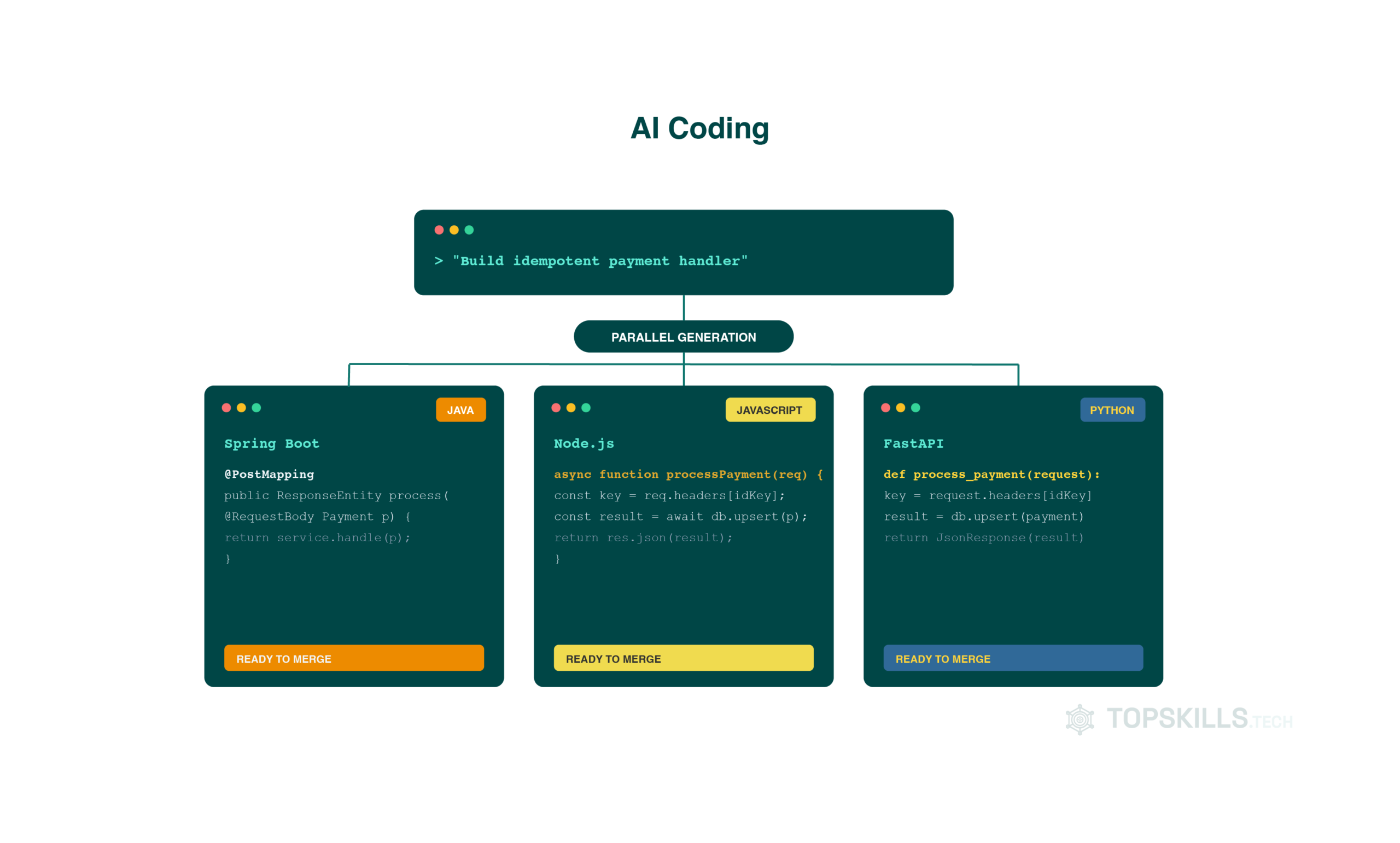
In Practice
This has been the greatest accelerator of my current project and the clearest example I have of how far codebase understanding has come:
With the goal of extracting 1 of 6 core features out of a legacy system into a new service, reviewing the code manually wasn’t an option.
Claude Code analysed the existing implementation and explained exactly how it worked, including places where Java reflection was being used. Because reflection resolves the method dynamically at runtime, the execution path can be genuinely difficult to trace from the source code alone.
Additionally, because we were only extracting 1 of 6 features, it also mapped out the impact on all the other features in the codebase and how to untangle just that one feature without breaking the rest of the workflow.
2. AI Code review
Bug detection and security at a scale no team could realistically staff for.
Every senior engineer knows what a good code reviewer should catch: The off-by-one error, the missing null check, the subtly insecure string concatenation that becomes a SQL injection 6 months later.
The problem was never that humans couldn’t catch these — it’s whether they could do so consistently, on every pull request, at the end of a long day of their own individual contributions. That was never realistic to staff for.
Snyk’s DeepCode AI can scan code for a large range of known data-flow vulnerability patterns in multiple languages, and does more than just flag the problem: it suggests the fix, with accuracy high enough that the suggested patch can be shipped directly in a reasonable number of cases.
Amazon CodeGuru does something similar for code quality and performance — it can profile production behaviour and flag the specific lines actually costing money at runtime, not just theoretically identifying inefficient patterns.
What makes this AI capability genuinely different from a linter or a static analysis tool?
It’s trained on millions of real codebases, so it recognises patterns a rulebook was never written to catch. It can also enforce the same standard on the 200th pull request of the day as the first — no fatigue, no “I’ll properly review this one tomorrow”.
Increasingly, general-purpose reasoning tools like Claude now rival purpose-built specialists at this too.
Which means, just on consistency alone, AI outperforms software engineers in review.
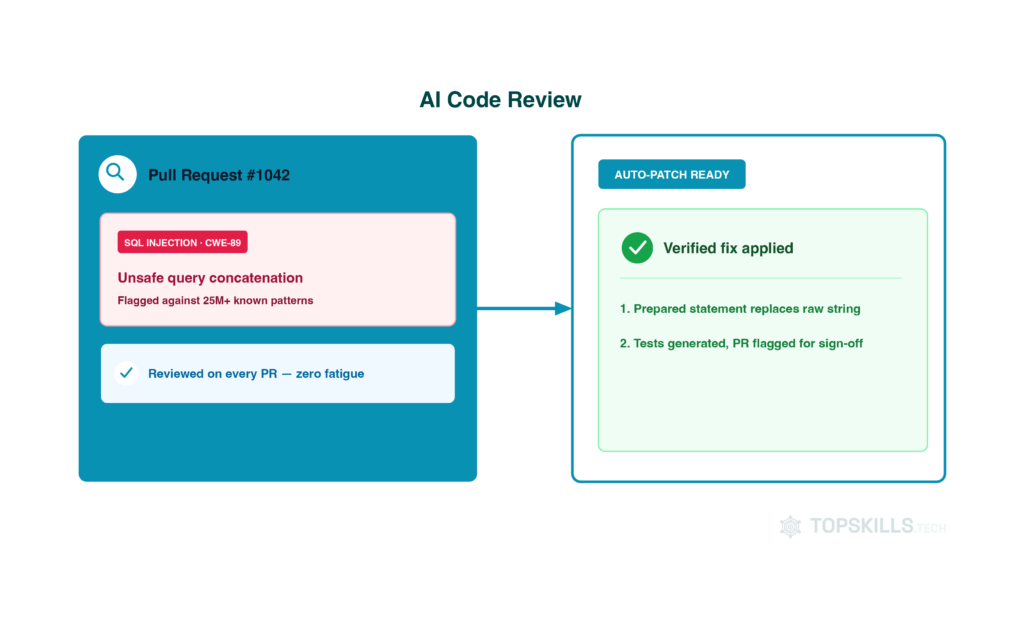
In Practice
We’re using Claude Code for the same purpose. Here’s an example:
For transparency, we keep a defect log on a wiki maintained by developers with different levels of English and different ways of describing the same bug.
When we run our defect-review tool with the right Claude skills, it does the following:
- Locates the actual root cause in the code
- Groups defects that share that root cause
- Helps write the fix
- Creates and runs the tests
- Raises a properly documented pull request — tracking IDs included, the original reporter added as a code reviewer
- Updates the defect status on the wiki to “awaiting review” automatically
At Visa, this also ties into our shift-left philosophy: Catching issues as early in the development process as possible, rather than in production.
With security scanning available directly as a Claude Code skill, we now catch vulnerabilities during code development.
A year ago, they’d have surfaced as late as when every change had landed on the release branch. Tracking down the change that introduced the vulnerability and resolving it before the release could progress became its own multi-day investigation.
3. AI Testing
Test suites that write and maintain themselves — at a scale most teams would struggle to keep up with.
Testing has always been the discipline we agree matters and almost never have enough time to do comprehensively. That’s exactly the gap AI closed fastest.
Diffblue Cover writes and maintains entire Java unit test suites autonomously — and it’s worth understanding how, because it’s not what most people assume.
Rather than using a large language model to guess what tests would be plausible, Diffblue uses reinforcement learning to generate, compile, run and validate real behaviour, not just match the pattern of a test.
It can write tests for moderately complex methods in seconds — the kind of tests that would take 20–30 minutes for an experienced engineer to write, with the help of copy/paste and the inevitable typos that come with it. When the underlying code changes, Diffblue updates the tests to match, rather than leaving a suite quietly rotting out of sync with the feature.
Beyond Unit Tests: UI Testing
Tools like Applitools extend the same idea into UI testing. They visually compare every screen against a baseline and flag regressions a human eye would likely miss after the 50th screenshot.
The result isn’t just faster testing. It’s testing that actually happens — consistently, on code that would otherwise have shipped with “we’ll add tests later,” which everyone knows is code for never.
So on the one thing that really matters, AI outperforms software engineers: the tests actually get written.
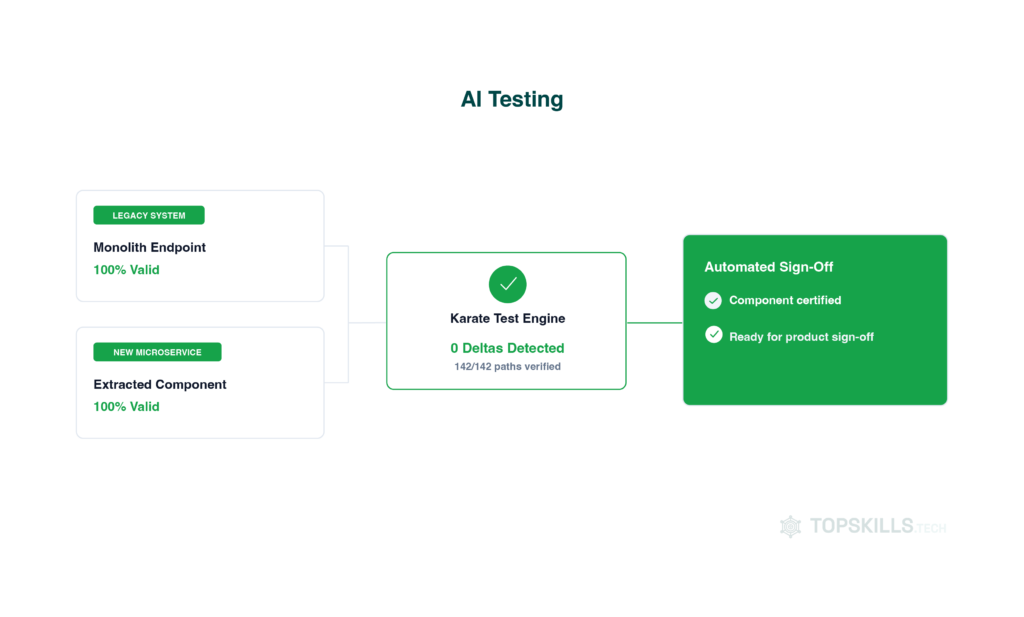
In Practice
Migrating a feature from a fully working legacy system to a brand-new component comes with one central challenge: proving the two produce identical results. Without that proof, no stakeholder signs off.
With Claude Code, we’ve been able to:
- Write component tests for the new system in Karate, covering every scenario, to certify the new microservice works as designed.
- Write Karate comparison tests that certify the legacy and new systems produce matching output.
- Trace the root cause of any delta between the two and fix it automatically, using the same root-cause tracing Claude Code already does for defects (see above).
- Generate branded summary reports co-designed with the Product team, ready for product sign-off.
Each of these standardised a process that now repeats across hundreds of payment pathways. It also simplified the sign-off process, replacing a trust-me conversation with documented evidence.
4. AI Documentation
Documentation that stays current with minimal software engineer effort.
Beyond disagreeing on approach, from well-written functions alone to full documentation — we deprioritise documentation the moment a deadline gets tight. Then we spend hours or days trying to figure out how an application actually works.
AI has quietly made that trade-off unnecessary.
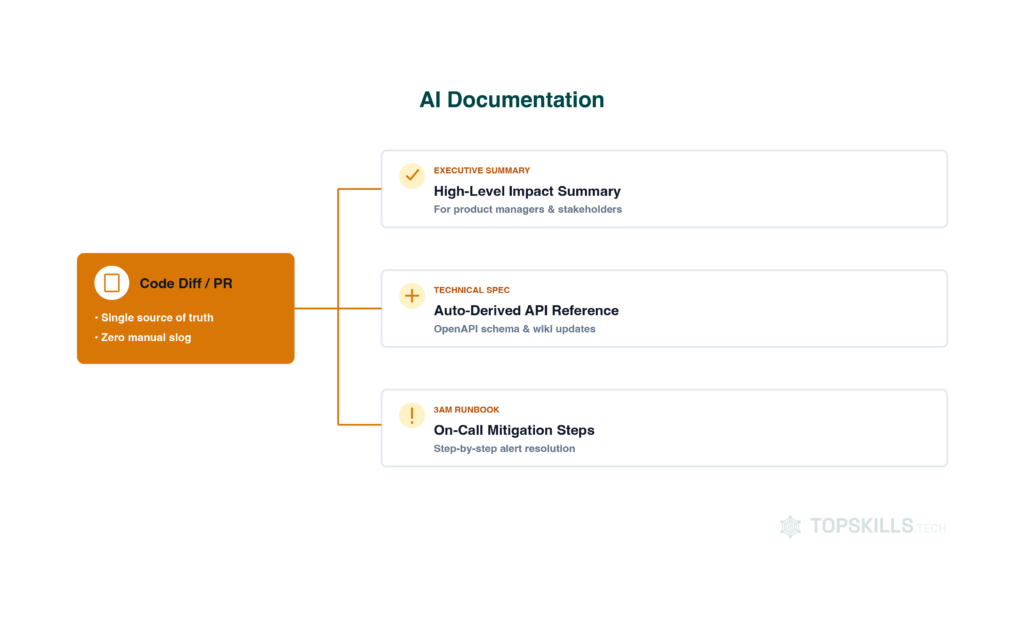
Modern documentation tools generate API references, onboarding guides and PR summaries directly from code, commits and diffs. This means the documentation is derived from the latest version of the code, not manually written 3 sprints ago and never revisited.
The same source can be used to prepare documentation for different audiences automatically, at different depths: an executive summary for stakeholders, a technical reference for new engineers, and an on-call runbook for whoever’s on call at 3am.
At keeping documentation current, AI outperforms software engineers because it never deprioritises it.
In Practice
We’ve put Claude Code to work to:
- Document Claude workflows and skills across the organisation
- Enforce checks so that code implemented with AI assistance is tracked and recorded as such
- Extract stakeholder-ready documentation and guides in whatever format and language they need
Wiki pages that used to take real effort are now genuinely easy to generate and keep current. A colleague once ran every wiki page related to my project through an AI documentation tool. The result: a cleaner, more complete, consolidated version — before I’d even finished writing the foundation documentation myself. Slightly humbling, and a real signal of where the bar has moved.
I’m now building a chatbot to make that same documentation instantly accessible for specific, quick answers rather than a page to read — likely a few hours of work, not weeks.
5. AI Production Monitoring
Production signals read at a scale no human could continuously monitor.
This capability is the one engineers tend to notice last, because it happens in production, not in the IDE.
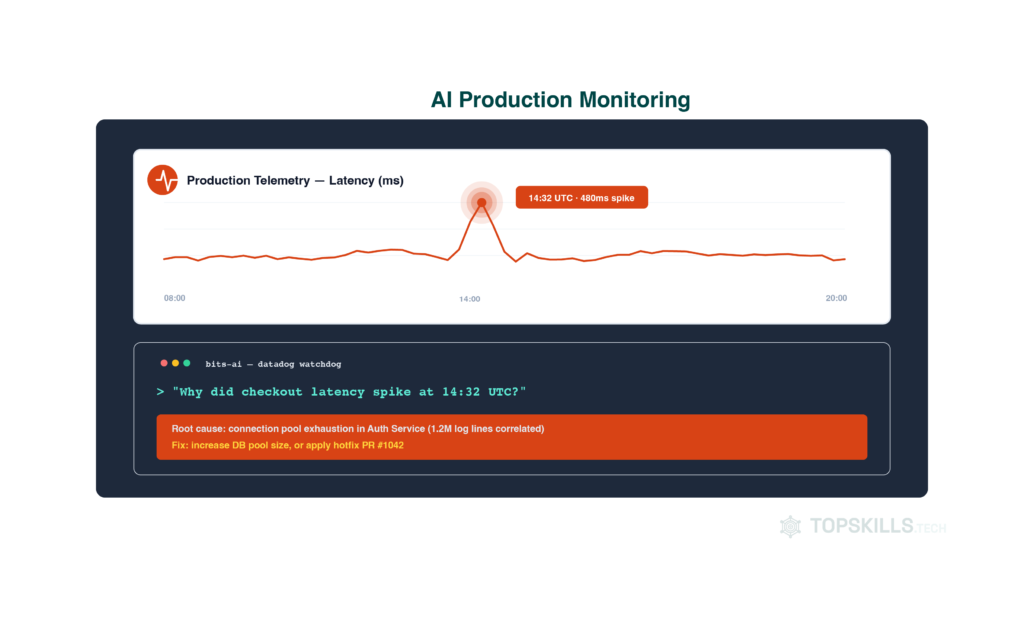
Datadog’s Watchdog continuously learns the normal rhythm of your systems, so it can tell the difference between a genuine 3am traffic spike and a normal evening peak in a different timezone — then flags real anomalies without anyone hand-writing static thresholds.
Its companion, Bits AI, lets an on-call engineer ask “why did checkout latency spike at 14:32 UTC” in plain language and get a traced, correlated answer pulled from the same telemetry the platform was already ingesting.
This is log analysis and pattern detection at a scale — millions of log lines correlated across services — that was never realistically a human task; it just took this long for something better to exist.
In Practice
One of the first applications I was accountable for at Visa was a workforce-planning tool. What started as spreadsheets turned into a Python script, and eventually an in-house tool that relied on machine learning to make these decisions.
It answered a big question:
How many people do we actually need when we expand to X markets, and by when, based on actual traffic? It was faster and far more reliable than the spreadsheet-and-gut-feel process it replaced.
The Compounding Effect: why aI Outperforms Software Engineers
None of the 5 capabilities above stay in their own lane anymore. Their value doesn’t simply add up — it compounds. And that’s the power of AI.
I like to explain AI capability compounding using career networking as an example: one connection leads to another, and each new connection adds value to the wider network, making the whole network incredibly powerful in the potential opportunities it creates.
That’s exactly what’s happening as these AI capabilities compound. The output of one becomes the input to another, creating possibilities that none of them could deliver alone. Shipping one ordinary feature today could look like:
- An AI-native IDE has already indexed your entire codebase, so it understands the surrounding context before you’ve typed a line.
- Copilot or Q Developer scaffolds the boilerplate.
- Diffblue generates the test suite behind it.
- Snyk scans the diff for vulnerabilities before it ever reaches a human reviewer.
- A documentation tool drafts the PR summary and updates the docs from the diff itself.
The value isn’t simply that each step is faster. It’s that each capability makes the next one more effective, so the gains accumulate rather than simply add up.
From Capabilities To Agentic Workflows
Increasingly, an agentic tool can chain several of these steps together with only a review gate at the end. Not a human hand on every step — the same agentic capability we covered in Part 1’s Agentic Era, from Devin’s descendants to Claude Code.
Every task in our transformative project has been built into Claude Code skills, forming a workflow. It takes a requirement from the user all the way through to ready-for-deployment in our certification and performance-testing environments.
We’ve gone further still, building applications whose workflows run entirely through agents with specialised responsibilities — genuinely testing how far an agentic workflow can be pushed.
Each capability on its own saves us time. Stacked together, they change our role from “AI helps me code faster” to “AI can own a meaningful slice of the delivery pipeline end to end.”
That’s the real reason this wave feels different from every previous round of developer tooling. Better autocomplete made us faster, but compounding changes what the tooling actually does.
It also cuts both ways, and it’s worth saying plainly:
AI amplifies whatever process you already have. Clear specs, strong test discipline and solid CI turn into genuine superpowers when we layer AI on top.
Where I haven’t used AI Yet
This post covers the five capabilities I’ve used AI hands-on and can write credibly about. Two I haven’t:
- Requirements and Design
- Deployments
I’d really like to hear how you’ve used them if you have. Please leave a comment or book a call and tell me about it.
Where AI Doesn’t Outperform Software Engineers (Yet)
None of this means AI is quietly finishing the job unsupervised.
Every example above is AI executing well-defined work exceptionally well. What it’s still not good at:
- Deciding what the well-defined work should actually be
- Untangling an ambiguous requirement
- Weighing a genuine architectural trade-off
- Knowing when the fast, obvious answer is the wrong one for your specific system
The distinction between AI doing defined work well and someone deciding what’s worth doing at all is where this series is headed next.
That’s exactly where Part 3 picks up. Get it in your inbox when Part 3 publishes:
the rest of this series:
- Part 1 - How AI Got Better Over 70 Years
- Part 2 (This post) - Where AI Outperforms Software Engineers.
- Part 3 - Where Software Engineers Still Beat AI: the skills that don't show up in a benchmark but decide whether a system survives contact with production.
- Part 4 - How AI Is Redefining Software Engineering Roles: which roles are shrinking, which are being reshaped, and which are brand new.
- Part 5 - How to Future-Proof Your Career: what to actually do about all of this, starting this quarter.